Data Cleansing
Data Cleansing turns a raw bronze table into a clean silver table without you writing the SQL. You describe the fix in plain English, DataPulse writes SQL, checks it is safe, shows a 100-row preview, and only then writes a clean copy. Your source table is never changed. In the left navigation the item is Data Cleansing; it is hidden below the Team licence tier.
How it works#
The AI sees column names, types and summary statistics and, while Share sample values with the model is on (the default), up to 5 real, unmasked values from each column with 20 or fewer distinct values. It never sees whole rows or columns with many distinct values. An admin can turn sample values off in Setup → Models. Its SQL passes a safety gate that blocks anything destructive (DROP, DELETE, UPDATE, GRANT, and similar). The model is one of the models your admin allowed in Setup → Models.
The seven steps#
The stepper across the page shows: Profile, Rules & scorecard, Describe, Review SQL, Dry-run, Run, Productionize. You can click a step to go back to it.
Walkthrough 1: pick a table#
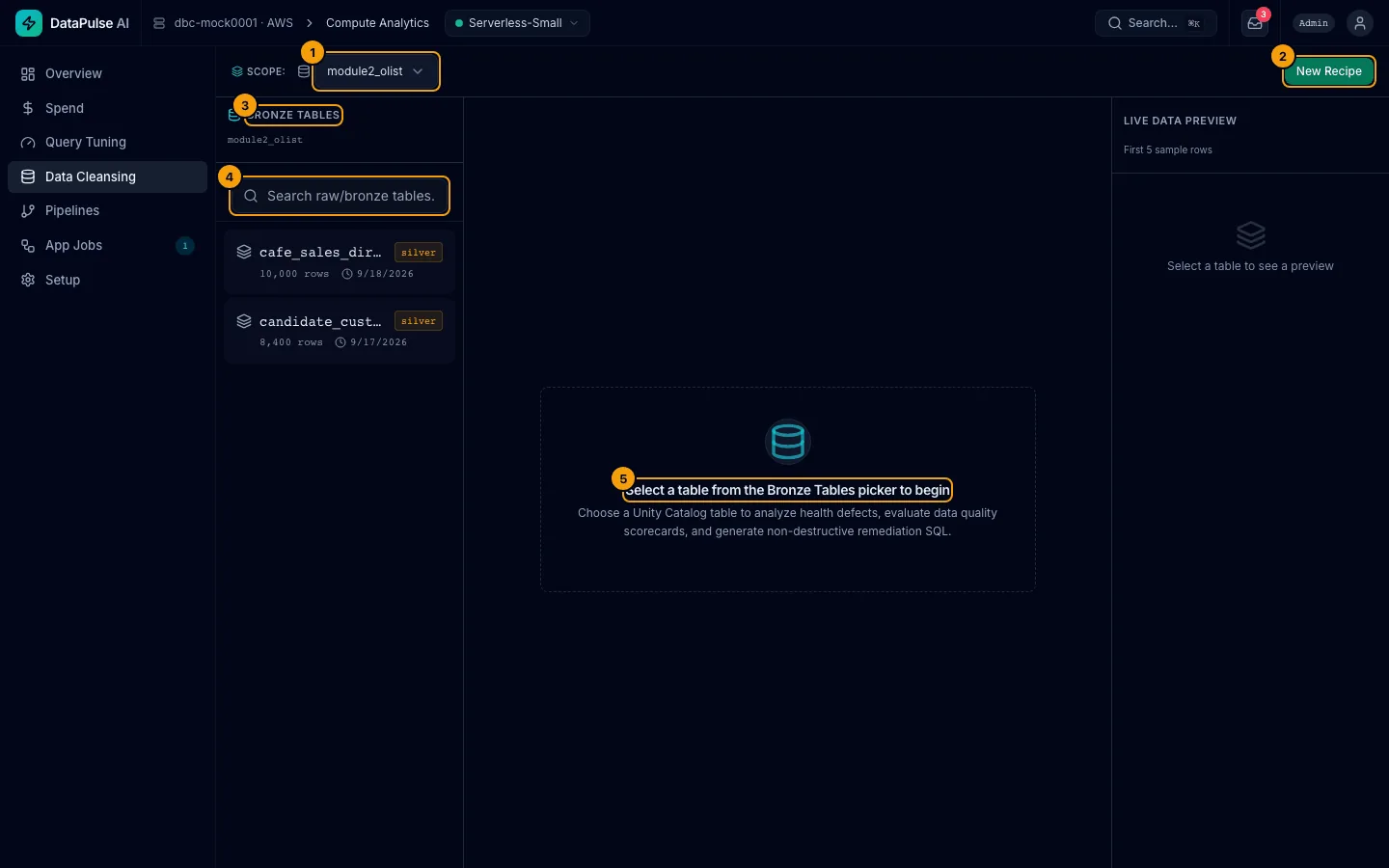
The pictures use sample data whose tables sit in a silver schema. In your workspace, Bronze Tables lists the tables in your source schemas (bronze and raw unless an admin changed them).
- The catalog selector in the scope bar. Choose the catalog that holds your raw data.
- New Recipe clears the page for a fresh recipe.
- The Bronze Tables panel lists the tables in that catalog's source schemas. The default source schemas are
bronzeandraw; an admin changes them in Setup → Data conventions. Each row shows the table name, its schema, its row count and when it last changed. You see only tables you may read. - Type in Search raw/bronze tables... to narrow the list.
- Until you click a table, the page says Select a table from the Bronze Tables picker to begin.
Once a table is selected, the Recent Recipes button in the table header opens your five most recent cleaning runs, each with its status and mode (sync or job). Click one to load it.
If the panel says No Bronze Schemas Found, the catalog has no schema with a source name. Use Go to Setup → Data conventions (admins can change the names there) or pick another catalog.
Walkthrough 2: profile the table#
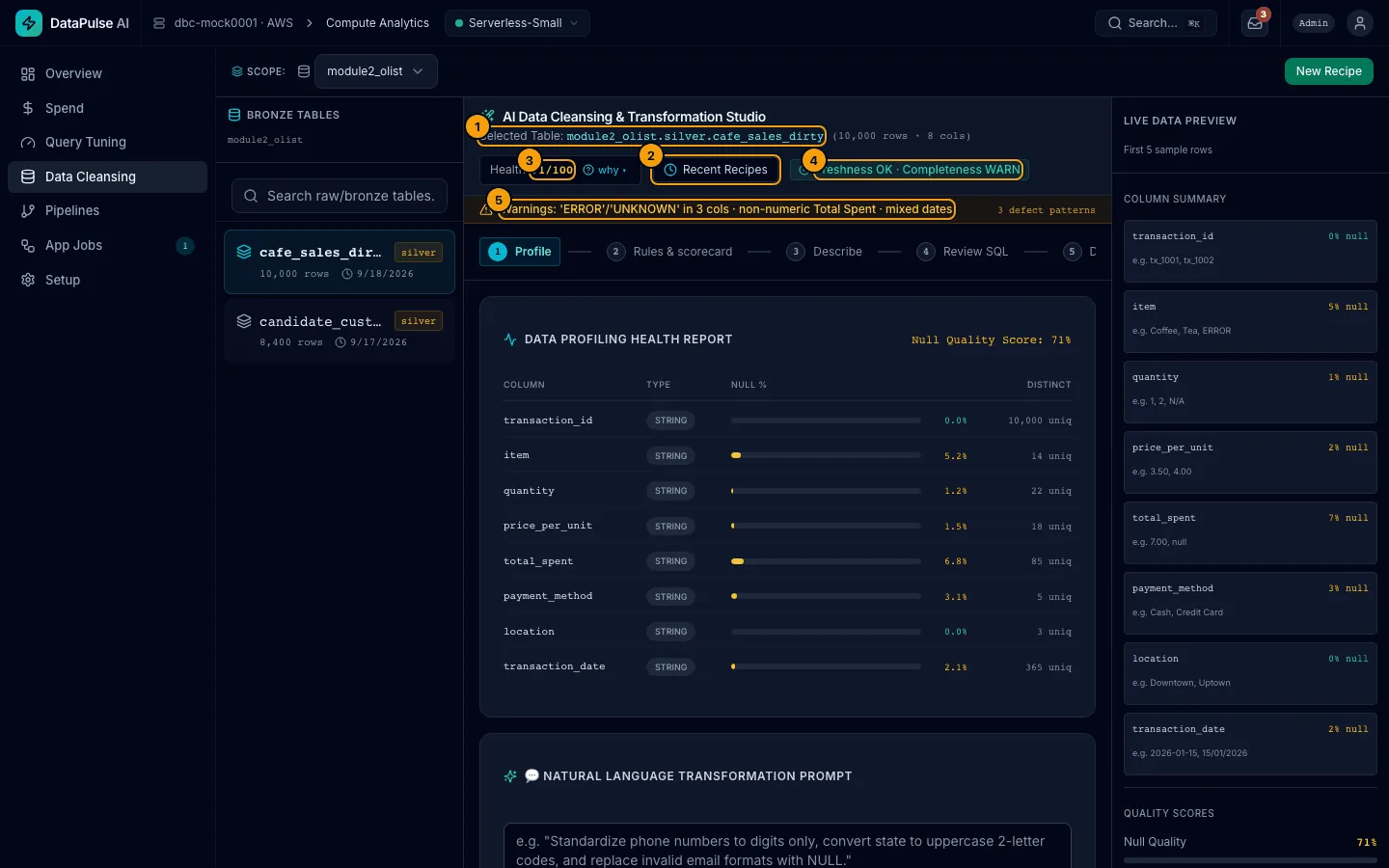
- The header shows the selected table.
- Recent Recipes opens your five most recent cleaning runs.
- Health is a score out of 100. why ▾ shows how it is calculated.
- The status chips show Databricks' own data quality monitor, when one is enabled on the table.
- Warnings list defects found, such as
ERRORorUNKNOWNtext in real columns, numbers stored as text, and mixed date formats.
The column report shows type, share of nulls (Null %), and Distinct values for each column.
A table of more than 10,000 rows is profiled on a sample of 500 rows, and the panel says so. A second profile of the same table can show slightly different percentages (see Known limitation below).
Walkthrough 3: check the rules#
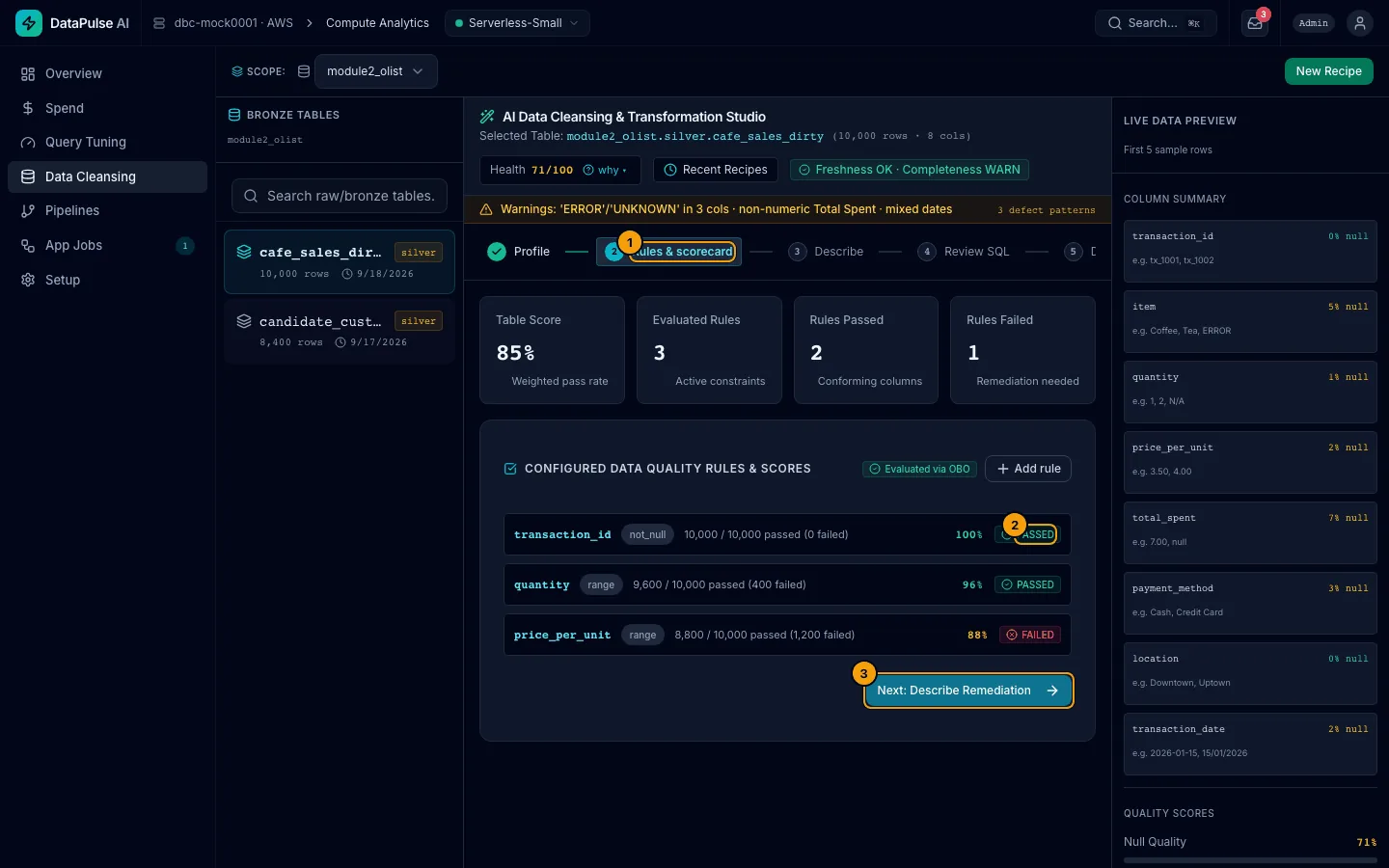
- Click Next: Rules & Scorecard. The stepper shows where you are.
- Each rule shows how many rows passed, for example
9,600 / 10,000 passed (400 failed), and PASSED or FAILED. - Next: Describe Remediation moves on.
To add a rule, choose a column, a Rule type and a Severity. This needs the cleansing engineer role or higher.
What each number means#
| Number | Meaning |
|---|---|
| Health (0–100) | 100 minus a penalty for nulls and a penalty for defect patterns. Higher is better. |
| Null Quality Score | The null part of the health score, as a percent. |
| Table Score | Weighted pass rate across all rules on the table. |
| Evaluated Rules | How many rules ran. |
| Rules Passed / Rules Failed | Counts of rules at or below their failure limit. |
| Rule types | Not null, Numeric range, Matches pattern, Unique, and Foreign key. |
Rules are run with your own access (Evaluated via OBO), so a row filter or column mask on the table applies to you.
Walkthrough 4: describe, review, and dry-run#
- In Describe, type what you want. For example: Replace ERROR/UNKNOWN with null, cast numbers, parse dates, dedupe. Choose a model if more than one is allowed, then click 🪄 Generate Remediating SQL. (The 🪄 Clean button on the Profile step does the same with the request you typed there.) You need the cleansing engineer role or higher.
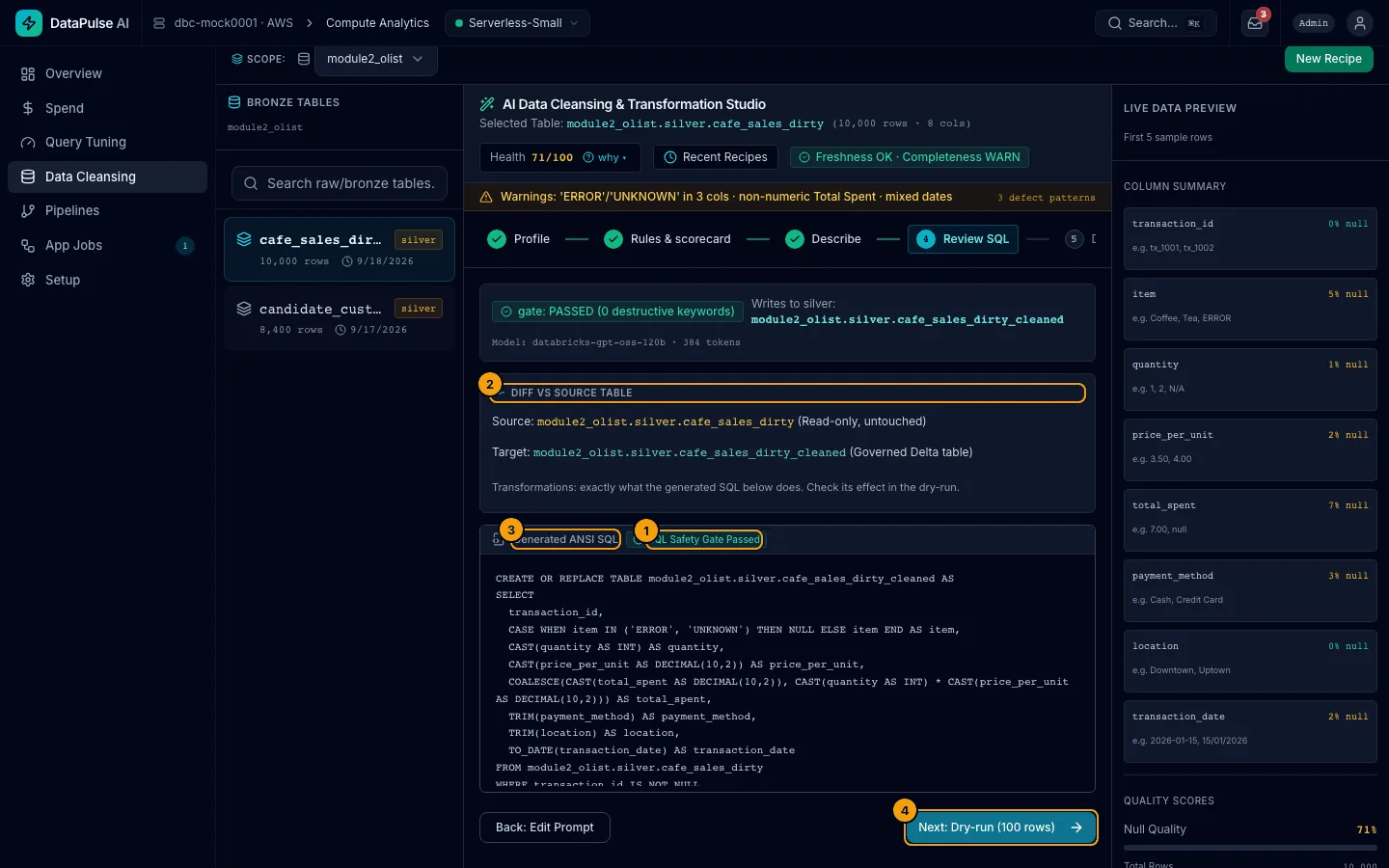
- SQL Safety Gate Passed and the model name are shown. If a request would delete or change data you see Blocked: Destructive SQL and nothing runs. A request to drop or delete the table is refused before any model is called.
- Diff vs Source Table. The source stays read-only. The target is a new silver table. Target Table is pre-filled as
<catalog>.silver.<table>_cleanedfrom Setup → Data conventions; you may change the table name, but the schema must be the conventions' target schema, or you getTARGET_SCHEMA_POLICY. An admin's change to the conventions applies to new recipes only. - Generated ANSI SQL. Read it. It is plain SQL you can copy.
- Next: Dry-run (100 rows) runs the query on 100 rows only.
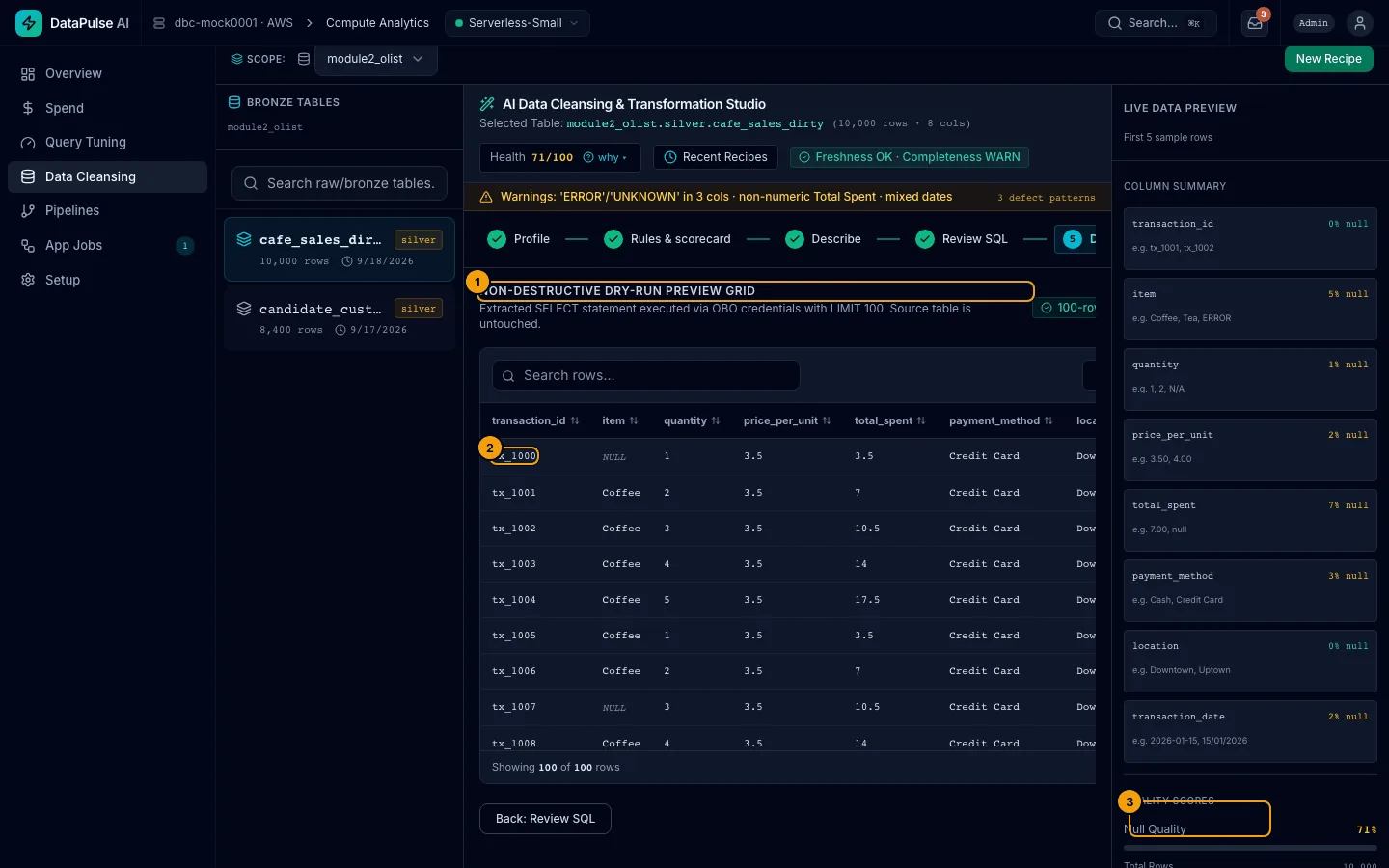
- The 100-row dry-run · Source untouched preview grid. Nothing is written.
- Check a few rows against what you asked for.
- Proceed to Run.
Walkthrough 5: run it#
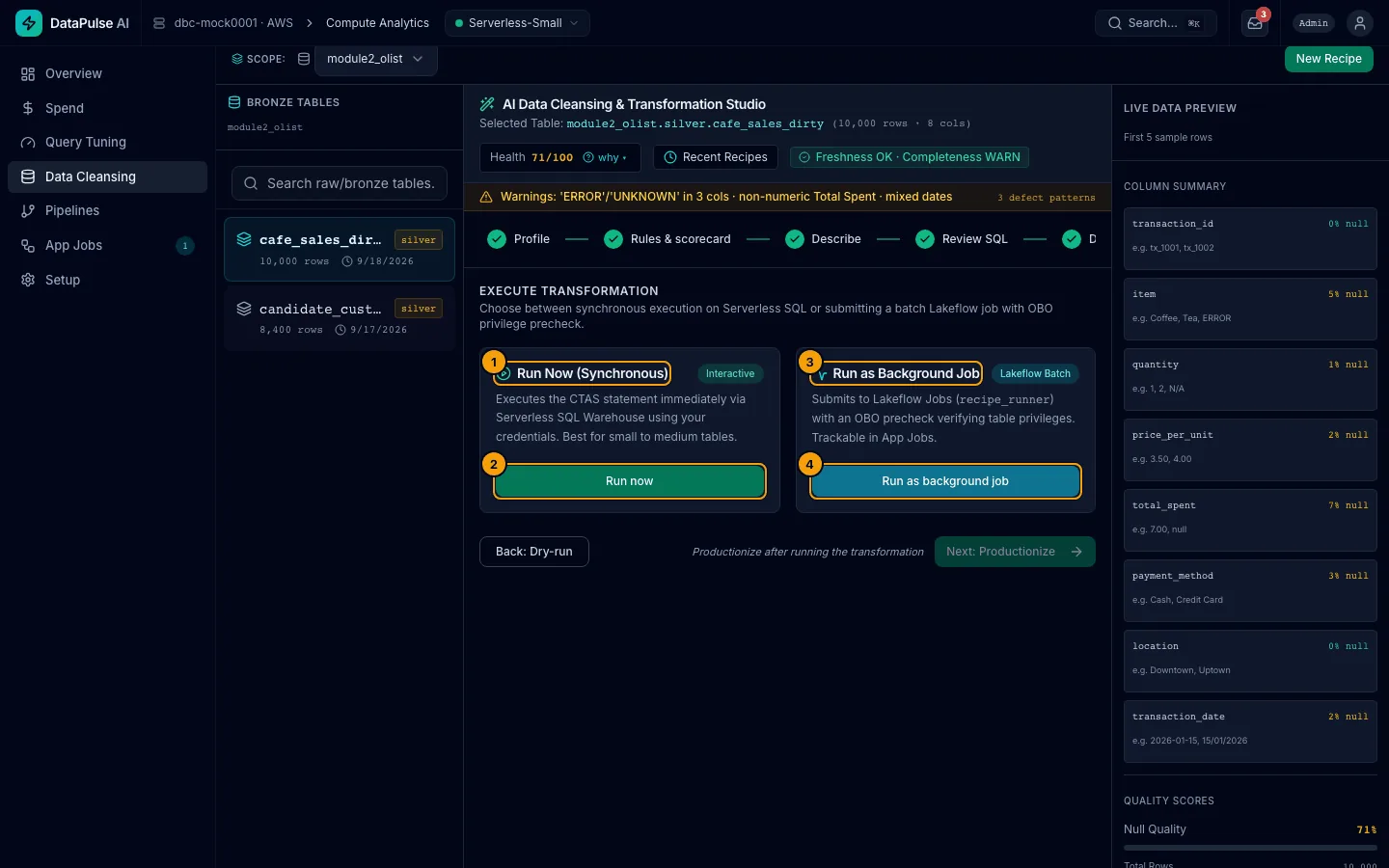
- Run Now (Synchronous). You wait while it runs. Good for small tables.
- Run now writes the clean table and tells you how many rows it wrote.
- Run as Background Job. A Lakeflow job does the work while you do something else.
- Run as background job starts it. A toast says Job submitted — view in App Jobs; click it to open App Jobs on that run. The run card on this page also shows the status and the rows written.
Both options use your permissions. Background runs check first that you can read the source and write to the target schema; if not, you get PRECHECK_DENIED and no job starts. You need the cleansing engineer role or higher to run.
If the target already exists and something reads it, the confirm dialog says Replacing <table> affects N tables … and shows MEDIUM RISK. A new table shows no warning.
Walkthrough 6: productionize (admins run it, everyone else requests it)#
- Click Next: Productionize. Set the Cron Schedule Expression (Quartz) and add any Enforced Expectations (checks on the result).
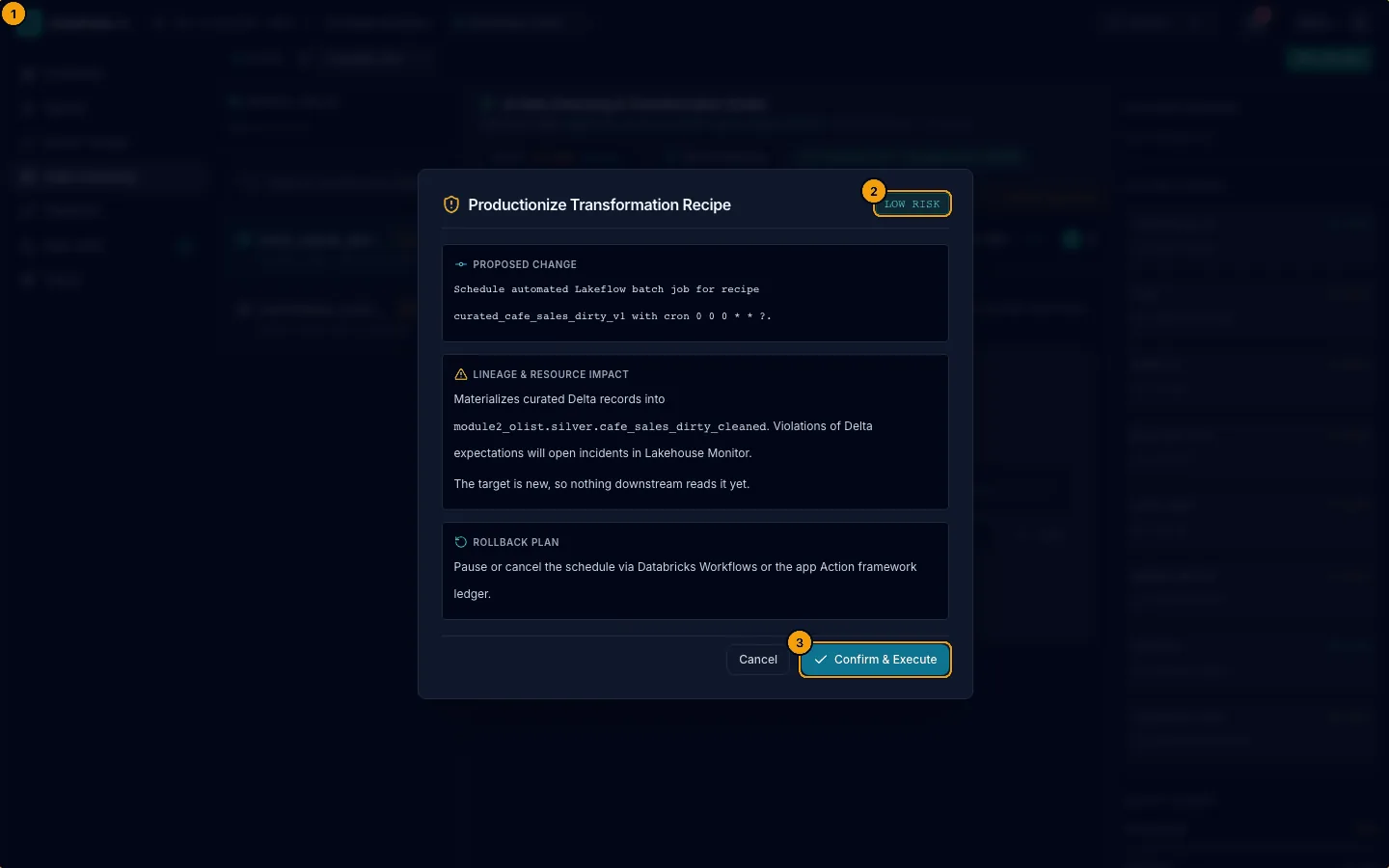
- Productionize Transformation Recipe schedules a repeat run and adds those checks.
- The risk level shows.
- Confirm & Execute (admins). A cleansing engineer or an operator with Data Cleansing sees Send request: the message Sent for approval. An app admin approves and runs it in the Actions inbox. shows with the action id and an Open Actions inbox link. A reader sees the button disabled: Your role can only view Data Cleansing.
The schedule ships paused. Your admin turns it on. See Jobs and schedules. If a scheduled run fails its checks, DataPulse opens an incident on the Pipelines page. A scheduled recipe runs the SQL as saved and names the model that wrote it.
Known limitations#
| Limit | Open item |
|---|---|
| The profile of a table over 10,000 rows uses a 500-row sample, so its percentages can differ from one profile to the next. | OI-191 |
| The profiler picks which columns to check from their names, so it can miss a defect in a column with an unusual name or flag a column whose name merely looks numeric. | OI-192 |
| After a background run finishes, the run card can keep saying it is running for a short while. App Jobs shows the true status. | OI-194 |
If you enable Databricks data-quality monitoring on a source schema, the monitor's metric tables (*_profile_metrics, *_drift_metrics) appear in the table list. Ignore them. | OI-190 |
Empty, denied, and failed states#
No table selected, a role that is too low, and a stopped warehouse each have their own message. See Troubleshooting.